Acl – Advanced Cross-Platform C/C++ Network Communication Library and Server Framework
0. About Acl Project
Acl (Advanced C/C++ Library) is a powerful cross-platform network communication library and server programming framework that supports Linux, Windows, Solaris, FreeBSD, macOS, Android, iOS, and HarmonyOS. Numerous applications developed with Acl run on various devices, providing stable and reliable services to hundreds of millions of users.
The Acl project includes a rich set of functional modules: network communication, server framework, application protocols, various codecs, and more. It has built-in implementations of common network protocols such as HTTP/SMTP/ICMP/MQTT/Redis/Memcached/Beanstalk/Handler Socket, as well as complete codec libraries including XML/JSON/MIME/BASE64/UUCODE/QPCODE/RFC2047/RFC1035, etc. Additionally, Acl provides a unified abstract interface for mainstream databases (MySQL, PostgreSQL, SQLite), enabling developers to write database applications more easily, quickly, and securely.
Software Architecture
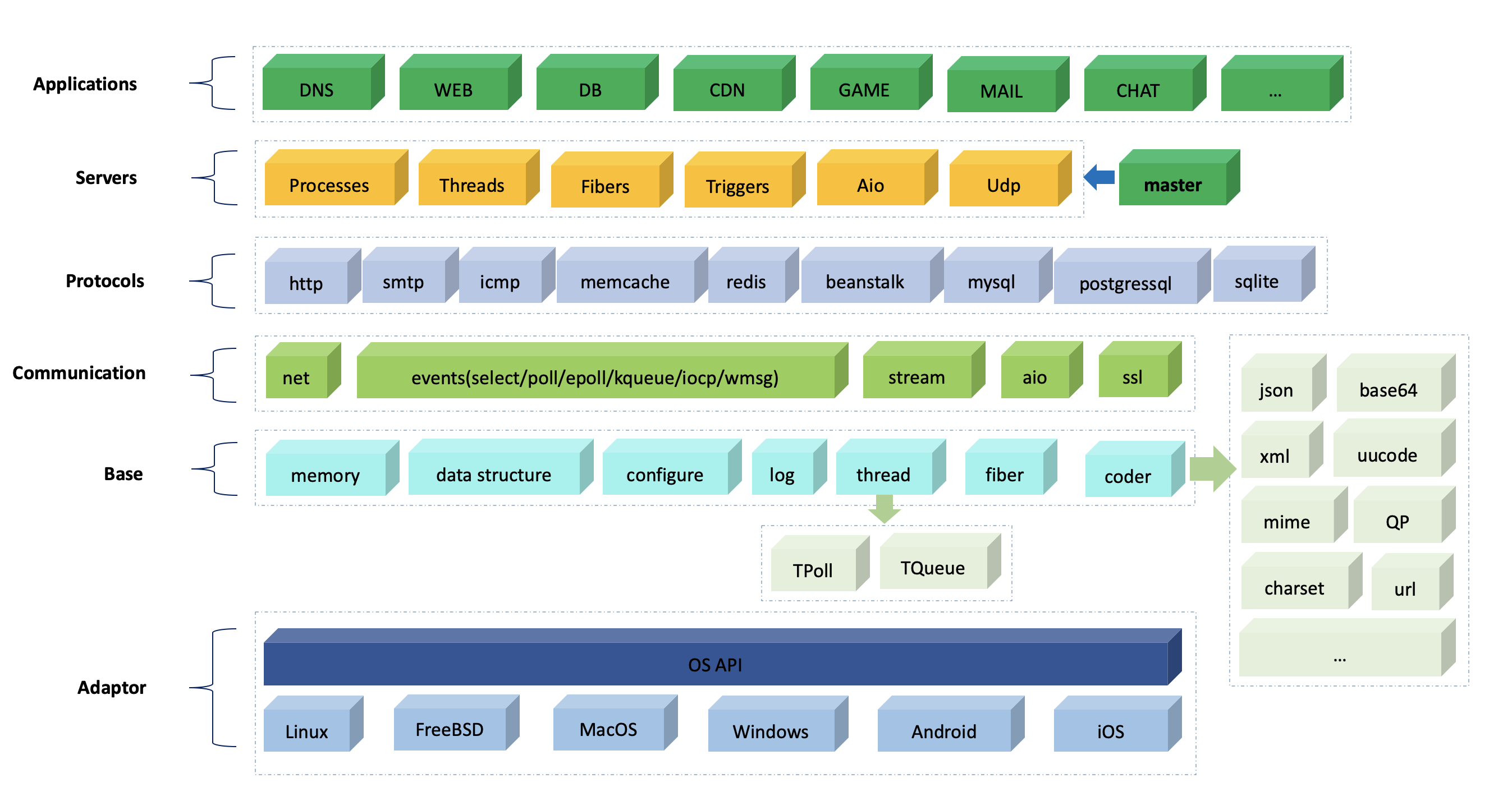
- 0. About Acl Project
- 1. Six Core Modules
- 2. Other Important Modules
- 3. Platform Support and Compilation
- 4. Quick Start
- 5. More Information
- 6. Appendix
- Real-World Products Built with acl
1. Six Core Modules
As a fully-featured C/C++ foundation library, Acl provides rich and practical functionality for application development. The six core modules include: Network Communication, Coroutine, HTTP, Redis Client, MQTT, and Server Framework.
1.1. Basic Network Module
Stream Processing Module
This module is the cornerstone of Acl’s network communication, providing a unified streaming communication interface that supports both network streams and file streams. Main features include:
- Read data line by line, automatically compatible with
\r\non Windows and\non UNIX - Read data line by line with automatic removal of trailing newline characters (
\nor\r\n) - Read data with custom string delimiters
- Read data of specified length
- Try to read a line or specified length of data
- Detect network IO status
- Write a line of data
- Formatted data writing (similar to
fprintf) - File stream positioning operations (similar to
fseek) - Batch write data (similar to UNIX
writev) - Truncate files (similar to
ftruncate) - Get file size and current file stream pointer position (similar to
ftell) - Get local and remote addresses of network streams
Network Operation Module
This module provides complete network operation functionality, including:
- Network server listening (supports TCP/UDP/UNIX domain sockets)
- Network client connection (supports TCP/UNIX domain sockets)
- DNS domain name query and result caching (supports both system API calls and direct DNS protocol)
- Socket operations and local network interface information retrieval
Non-blocking Network Stream
Comprehensive support for non-blocking network operations, including non-blocking connections, reads (line reads, specified length reads), writes (line writes, specified length writes, batch writes), etc.
Common Network Application Protocol Library
Built-in implementations of common network application protocols such as HTTP, SMTP, ICMP, etc. The HTTP and ICMP modules support both blocking and non-blocking communication modes. The HTTP protocol in the C++ version of lib_acl_cpp provides both server and client modes:
- Server Mode: Provides a Java HttpServlet-like interface, supports Cookie, Session, HTTP MIME file upload, etc.
- Client Mode: Supports connection pool and cluster management, chunked transfer, automatic character set conversion, automatic decompression, resume download, and other rich features
Common Network Communication Library
Provides client communication libraries for Memcached, Beanstalk, Handler Socket, etc., all supporting connection pool mode.
1.2. Coroutine
Acl’s coroutine module is a mature and stable cross-platform coroutine library that has been widely used and validated in many important projects.
Platform Support
- Supports mainstream operating systems including Linux, macOS, Windows, iOS, and Android
- Supports multiple CPU architectures including x86, ARM, etc.
- Supports multiple event engines including select/poll/epoll/kqueue/iocp/win32 GUI messages
Core Features
- Complete DNS Protocol Implementation: DNS protocol is natively implemented in coroutines, DNS API can be used directly in coroutines
- System API Hook: Automatically hooks system IO APIs on Unix and Windows platforms to enable coroutine support
- Read APIs: read/readv/recv/recvfrom/recvmsg
- Write APIs: write/writev/send/sendto/sendmsg/sendfile64
- Socket APIs: socket/listen/accept/connect/setsockopt
- Event APIs: select/poll/epoll_create/epoll_ctl/epoll_wait
- DNS APIs: gethostbyname/gethostbyname_r/getaddrinfo/freeaddrinfo
- Shared Stack Mode: Supports shared stack mode to significantly reduce memory usage
Synchronization Primitives
- Coroutine Mutex and Semaphore: For synchronization between coroutines
- Coroutine Event: Supports synchronous communication between coroutines and threads
For more details, see Using Acl Coroutine Library
1.3. HTTP Module
Complete implementation of HTTP/1.1 protocol, supporting both client and server application development.
Main Features
- Java HttpServlet-like Interface (server side): Provides familiar programming interface, reducing learning curve
- Connection Pool Mode (client side): Efficiently manages connection resources, improves performance
- Chunked Transfer: Supports streaming data transfer
- Compression: Built-in Gzip compression/decompression support
- SSL/TLS Encryption: Supports secure encrypted transmission
- Resume Download: Supports resume download for large files
- Cookie Management: Complete cookie setting and retrieval functionality
- Session Management (server side): Built-in session management mechanism
- WebSocket Support: Supports WebSocket protocol
- HTTP MIME Format: Supports MIME multipart data format
- Sync/Async Mode: Flexible choice of communication modes
1.4. Redis Client
Acl’s Redis client module is powerful, high-performance, and easy to use, making it an ideal choice for production environments.
Features
- Rich Command Support: Supports Redis data types and commands including Bitmap/String/Hash/List/Set/Sorted Set/PubSub/HyperLogLog/Geo/Script/Stream/Server/Cluster
- STL-style Interface: Provides STL-like C++ interface for each Redis command, conforming to C++ programming conventions
- Smart Cluster Management: Client automatically caches and adapts to changes in Redis cluster hash slots without manual intervention
- Multiple Communication Modes: Supports standalone, cluster, and pipeline modes with unified interface
- Connection Pool Support: Built-in connection pool supporting standalone and cluster modes, improving resource utilization
- High Performance: Excellent performance in cluster and pipeline modes
- Automatic Retry: Automatically retries on network errors, improving reliability
- Coroutine Friendly: Can be used in shared stack coroutine mode
For more details, see Using Acl Redis Client
1.5. MQTT Module
Acl fully implements the MQTT 3.1.1 protocol with a streaming parser design that can flexibly adapt to various IO modes.
Core Features
- Complete MQTT 3.1.1 Protocol Support: Implements all standard commands
- CONNECT/CONNACK/PUBLISH/PUBACK/PUBREC/PUBREL/PUBCOMP
- SUBSCRIBE/SUBACK/UNSUBSCRIBE/UNSUBACK
- PINGREQ/PINGRESP/DISCONNECT
- Object-Oriented Design: Each MQTT command corresponds to an independent class with clear structure
- Streaming Parser: Independent of IO mode, can be combined with any network communication method
- Separation of Parsing and Communication: Data parsing is completely decoupled from network communication, providing high flexibility
- Dual-End Support: Can be used for both client and server development
For more details, see Using Acl MQTT
1.6. Server Framework
The server framework is the core module in Acl, helping developers quickly build high-performance backend services (such as web services). Through the code generation tool in app/wizard, a complete service code framework can be generated in seconds.
Architecture Design
The Acl server framework consists of two parts:
- Service Manager (acl_master): Derived from the famous Postfix MTA’s master process, extensively extended to become a general-purpose service manager
- Service Templates: Provides multiple service templates for developers to choose from
Six Service Templates
- Process Service Model
One connection per process.- Advantages: Simple programming, safe and stable
- Disadvantages: Limited concurrency
- Use Cases: High security requirements, low concurrency scenarios
- Thread Service Model
Each process handles all client connections through a thread pool, using IO event triggering mechanism.- Advantages: Handle many connections with few threads, relatively simple programming
- Features: Threads are bound only when connections have data, released immediately after processing
- Use Cases: High concurrency scenarios, easier to develop than AIO model
- AIO Service Model (Non-blocking)
Similar to Nginx/Squid/IRCd, single thread handles many connections in non-blocking IO mode.- Advantages: High processing efficiency, low resource consumption
- Disadvantages: Higher programming complexity
- Use Cases: Ultra-high concurrency, extreme performance requirements
- Coroutine Service Model
Combines the high concurrency capability of non-blocking model with the simplicity of synchronous programming.- Advantages: High concurrency + low programming complexity, sequential IO programming style
- Features: Automatically converts blocking operations to non-blocking processes, improving concurrency
- Use Cases: Preferred choice for high concurrency scenarios, balancing performance and development efficiency
- UDP Service Model
Service model specifically for UDP communication.- Use Cases: Applications requiring UDP protocol
- Trigger Service Model
For handling scheduled tasks in background services (similar to system crontab).- Use Cases: Scheduled tasks, background scheduling
2. Other Important Modules
2.1. MIME Module
MIME (Multipurpose Internet Mail Extensions) is an important data format standard widely used in email and web applications.
Features
- Complete implementation of MIME-related RFC standards: RFC2045/RFC2047/RFC822
- Provides streaming MIME data parser independent of IO model
- Can be flexibly used in synchronous or asynchronous IO programs
- Supports MIME data parsing and construction
2.2. Codec Module
Acl provides rich codecs, all using streaming parsing design, independent of the IO communication layer.
Supported Codec Formats
- JSON: Streaming JSON parser and builder, supports serialization/deserialization between JSON data and C structures, greatly improving development efficiency
- XML: Streaming XML parser and builder
- Base64: Base64 encoding/decoding
- URL: URL encoding/decoding
- Others: UUCODE, QPCODE, RFC2047, etc.
2.3. Database Module
Acl provides a unified database abstraction interface to simplify database application development.
Core Features
- Unified Interface: Provides unified operation interface for MySQL, PostgreSQL, SQLite
- SQL Security: Built-in SQL codec automatically escapes special characters, effectively preventing SQL injection attacks
- Dynamic Loading: Uses dynamic library loading, no need to worry about dependencies when not using database functionality
- Connection Pool Support: Built-in database connection pool management
2.4. Connection Pool Manager
Acl provides a general connection pool manager widely used in various client communication modules of the Acl library.
Application Scenarios
- Redis client connection pool
- Database connection pool
- HTTP client connection pool
- Other network client connection pools
2.5. Other Client Libraries
In addition to the Redis client, Acl implements various commonly used client communication libraries.
Supported Clients
- Memcached: Supports connection pool
- Handler Socket: Client for MySQL’s Handler Socket plugin
- Beanstalk: Message queue client
- Disque: Distributed message queue client
2.6. DNS Module
Acl provides a complete DNS solution that can use system APIs or directly implement DNS protocol.
Features
- System API Wrapper: Wraps system APIs such as
getaddrinfoandgethostbyname - Protocol Implementation: Complete implementation of DNS protocol specified in RFC1035
- Dual-End Support: Can be used to implement DNS client or DNS server
- Result Caching: Supports DNS query result caching to improve performance
3. Platform Support and Compilation
3.1. Compiling Acl on Different Platforms
Acl is a cross-platform library supporting mainstream operating systems and multiple compilation toolchains.
Supported Platforms
- Linux, Windows, macOS, FreeBSD, Solaris
- Android, iOS, Harmony
Compilation Methods
Linux/UNIX Platform
- Compiler: gcc/clang
- Make Method:
cd acl/
make
After compilation, the following will be generated in the
acl/directory:libacl_all.a(static library, containing lib_acl.a, lib_protocol.a, and libacl_cpp.a)libacl_all.so(dynamic library)
- CMake Method:
./cmake-build.sh - XMake Method:
xmake
Windows Platform
- Supports Visual Studio 2003/2008/2010/2012/2013/2015/2019 and other versions
- For VS6/VS2005, refer to VS2003 compilation configuration
macOS/iOS Platform
- Compile using Xcode
Android Platform
- Open the
acl/android/acl_ndk20b/project with Android Studio
Harmony Platform
- Open the
acl/harmony/api13/project with DevEco Studio
Cross-Platform Compilation
- Supports cross-platform compilation using CMake
3.2. Notes on Windows Compilation
When using Acl dynamic libraries in Windows environment, you need to add corresponding predefined macros in your project.
Predefined Macro Description
| Library Used | Required Predefined Macro | Description |
|---|---|---|
| lib_acl dynamic library | ACL_DLL |
Base library |
| lib_protocol HTTP library | HTTP_DLL |
HTTP protocol library |
| lib_protocol ICMP library | ICMP_DLL |
ICMP protocol library |
| lib_acl_cpp dynamic library | ACL_CPP_DLL |
C++ library |
Detailed Instructions
- For detailed compilation process and configuration methods, see: Acl Library Compilation and Usage
4. Quick Start
4.1. First Acl Example
This is the simplest Acl program, demonstrating how to use Acl’s string class.
#include <iostream>
#include "acl_cpp/lib_acl.hpp"

int main() {
  acl::string buf = "hello world!\r\n";
  std::cout << buf.c_str() << std::endl;
  return 0;
}
4.2. Simple TCP Server
This example shows how to create a simple TCP echo server using Acl, handling client connections with multiple threads.
#include <thread>
#include "acl_cpp/lib_acl.hpp"

void run() {
  const char* addr = "127.0.0.1:8088";
  acl::server_socket server;
  if (!server.open(addr)) {  // Bind and listen on local address.
    return;
  }

  while (true) {
    acl::socket_stream* conn = server.accept(); // Wait for connection.
    if (conn == NULL) {
      break;
    }
    std::thread thread([=] {  // Start a thread to handle the connection.
      char buf[256];
      int ret = conn->read(buf, sizeof(buf), false);  // Read data.
      if (ret > 0) {
        conn->write(buf, ret);  // Write received data.
      }
      delete conn;
    });
    thread.detach();
  }
}
4.3. Simple TCP Client
This example shows how to create a TCP client using Acl, connecting to a server and sending/receiving data.
#include "acl_cpp/lib_acl.hpp"

void run() {
  const char* addr = "127.0.0.1:8088";
  int conn_timeout = 5, rw_timeout = 10;
  acl::socket_stream conn;
  if (!conn.open(addr, conn_timeout, rw_timeout)) { // Connect to server.
    return;
  }
  const char data[] = "Hello world!\r\n";
  if (conn.write(data, sizeof(data) - 1) == -1) {  // Send data to server.
    return;
  }
  char buf[256];
  int ret = conn.read(buf, sizeof(buf) - 1, false);
  if (ret > 0) {  // Read from server.
    buf[ret] = 0;
    std::cout << buf << std::endl;
  }
}
4.4. Coroutine TCP Server
This example shows how to create a high-concurrency TCP server using Acl coroutines, implementing asynchronous processing with sequential programming style.
#include "acl_cpp/lib_acl.hpp"
#include "fiber/go_fiber.hpp"

void run() {
  const char* addr = "127.0.0.1:8088";
  acl::server_socket server;
  if (!server.open(addr)) {
    return;
  }

  go[&] {  // Create a server coroutine to wait for connections.
    while (true) {
      acl::shared_stream conn = server.shared_accept();
      if (conn == nullptr) {
        break;
      }

      go[conn] {  // Create a client coroutine to handle the connection.
        while (true) {
          char buf[256];
          int ret = conn->read(buf, sizeof(buf), false);
          if (ret <= 0 || conn->write(buf, ret) != ret) {
            break;
          }
        }
      };
    }
  };

  acl::fiber::schedule();  // Start the coroutine scheduling process.
}
4.5. HTTP Client Example
This example shows how to create an HTTP client using Acl, sending HTTP requests and getting responses.
#include "acl_cpp/lib_acl.hpp"

bool run() {
  acl::http_request conn("www.baidu.com:80");
  acl::http_header& header = conn.request_header()
  header.set_url("/")
    .set_keep_alive(false);
    .set_content_type("text/html");

  if (!conn.request(NULL, 0)) {
    return false;
  }
  int status = conn.http_status();
  if (status != 200) {
    return false;
  }
  long long len = conn.body_length();
  if (len <= 0) {
    return true;
  }
  acl::string buf;
  if (!conn.get_body(body)) {
    return false;
  }
  return true;
}
4.6. Coroutine HTTP Server
This example shows how to create a fully-featured HTTP server using Acl coroutines, supporting routing, configuration management, and other features.
#include "acl_cpp/lib_acl.hpp"  // Must be before http_server.hpp
#include "fiber/http_server.hpp"

static char *var_cfg_debug_msg;
static acl::master_str_tbl var_conf_str_tab[] = {
  { "debug_msg", "test_msg", &var_cfg_debug_msg },
  { 0, 0, 0 }
};

static int  var_cfg_io_timeout;
static acl::master_int_tbl var_conf_int_tab[] = {
  { "io_timeout", 120, &var_cfg_io_timeout, 0, 0 },
  { 0, 0 , 0 , 0, 0 }
};

int main(int argc, char* argv[]) {
  const char* addr = "0.0.0.0|8194";
  const char* conf = argc >= 2 ? argv[1] : NULL;
  acl::http_server server;

  // Call methods in acl::master_base class.
  server.set_cfg_int(var_conf_int_tab).set_cfg_str(var_conf_str_tab);

  // Call methods in acl::http_server.
  server.on_proc_init([&addr] {
    printf("---> after process init: addr=%s, io_timeout=%d\r\n", addr, var_cfg_io_timeout);
  }).on_proc_exit([] {
    printf("---> before process exit\r\n");
  }).on_proc_sighup([] (acl::string& s) {
    s = "+ok";
    printf("---> process got sighup\r\n");
    return true;
  }).on_thread_accept([] (acl::socket_stream& conn) {
    printf("---> accept %d\r\n", conn.sock_handle());
    return true;
  }).Get("/", [](acl::HttpRequest&, acl::HttpResponse& res) {
    std::string buf("hello world1!\r\n");
    res.setContentLength(buf.size());
    return res.write(buf.c_str(), buf.size());
  }).Post("/json", [](acl::HttpRequest& req, acl::HttpResponse& res) {
    acl::json* json = req.getJson();
    if (json) {
      return res.write(*json);
    } else {
      std::string buf = "no json got\r\n";
      res.setContentLength(buf.size());
      return res.write(buf.c_str(), buf.size());
    }
  }).run_alone(addr, conf);

  return 0;
}
4.7. Redis Client Example
This example shows how to use the Acl Redis client for multi-threaded operations, including connection pool management and basic Redis commands.
#include <thread>
#include "acl_cpp/lib_acl.hpp"

static void thread_run(acl::redis_client_cluster& conns) {
  acl::redis cmd(&conns);
  std::map<acl::string, acl::string> attrs;
  attrs["name1"] = "value1";
  attrs["name2"] = "value2";
  attrs["name3"] = "value3";
  acl::string key = "hash-key-1";
  if (!cmd.hmset(key, attrs)) {
    printf("hmset error=%s\r\n", cmd.result_error());
    return;
  }

  attrs.clear();
  if (!cmd.hgetall(key, attrs)) {
    printf("hgetall error=%s\r\n", cmd.result_error());
  }
}

void run() {
  const char* addr = "126.0.0.1:6379";
  acl::redis_client_cluster conns;
  conns.set(addr, 0);

  const size_t nthreads = 10;
  std::thread threads[nthreads];
  // Create some threads to test redis using the same conns.
  for (size_t i = 0; i < nthreads; i++) {
    threads[i] = std::thread(thread_run, std::ref(conns));
  }
  // Wait for all threads to exit
  for (size_t i = 0; i < nthreads; i++) {
    threads[i].join();
  }
}
5. More Information
5.1. Sample Code
The Acl library provides a large number of sample codes for learning and reference, covering the usage of various functional modules.
Sample Index: SAMPLES.md
5.2. More Simple Examples
To help developers get started quickly, we provide many simple and easy-to-understand small examples.
Sample Repository: Acl Demos
5.3. FAQ
Encountering problems when using Acl? Check the frequently asked questions.
FAQ Document: FAQ.md
5.4. Open Source License
Acl adopts the LGPL-v2.1 open source license and can be freely used in commercial and non-commercial projects.
License Details: LICENSE.txt
5.5. Related Links
Official Resources
- 🌐 Official Website: https://acl-dev.cn/
- 💻 GitHub: https://github.com/acl-dev/acl
- 🇨🇳 Gitee: https://gitee.com/acl-dev/acl
- 📝 Technical Blog: https://blog.csdn.net/zsxxsz
- 🐦 Weibo: http://weibo.com/zsxxsz
Community
- 💬 QQ Group: 705290654
5.6. Acknowledgments
Thanks to <a href=https://jb.gg/OpenSourceSupport target=_blank><img widith=100 height=50 src=res/logo/clion_icon.png /> </a> for supporting the Acl project.
6. Appendix
6.1. Software Layered Architecture
┌─────────────────────────────────────────────────────────┐
│                   Application Layer                      │
│  Business code, HTTP server, WebSocket service, etc.     │
└─────────────────────────────────────────────────────────┘
                          ↓
┌────────────────────────────────────────────────────────┐
│             High-level API Layer                        │
│  ┌──────────┬──────────┬──────────┬──────────┐         │
│  │  HTTP    │  Redis   │   MQTT   │   DB     │         │
│  │ Module   │  Module  │  Module  │  Module  │         │
│  └──────────┴──────────┴──────────┴──────────┘         │
│  ┌──────────┬──────────┬──────────┬──────────┐         │
│  │  Master  │  Fiber   │ ConnPool │  Stream  │         │
│  │Framework │Coroutine │   Pool   │Processing│         │
│  └──────────┴──────────┴──────────┴──────────┘         │
└────────────────────────────────────────────────────────┘
                          ↓
┌─────────────────────────────────────────────────────────┐
│             Core Library Layer                           │
│  - Network I/O (socket, stream, aio)                    │
│  - Event-driven (event, epoll, kqueue, iocp)            │
│  - Memory management (memory pool, dbuf)                │
│  - Data structures (string, array, hash, list)          │
│  - Utilities (log, config, thread, process)             │
└─────────────────────────────────────────────────────────┘
                          ↓
┌───────────────────────────────────────────────────────────┐
│             Operating System Layer                         │
│  Linux / FreeBSD / macOS / Windows / Android / iOS / Harmony  │
└───────────────────────────────────────────────────────────┘
6.2. Project Directory Structure
acl/
├── lib_acl/                    # Core C library (base library)
│   ├── include/                # Public header files
│   ├── src/                    # Source code implementation
│   │   ├── stdlib/             # Standard library (string, memory, file, etc.)
│   │   │   ├── common/         # Common data structures (hash, list, queue, tree, etc.)
│   │   │   ├── memory/         # Memory management (memory pool, slab, dbuf)
│   │   │   ├── string/         # String operations
│   │   │   ├── filedir/        # File and directory operations
│   │   │   ├── configure/      # Configuration file parsing
│   │   │   ├── iostuff/        # IO utility functions
│   │   │   ├── debug/          # Debugging tools
│   │   │   └── sys/            # System-related wrappers
│   │   ├── net/                # Network module
│   │   │   ├── connect/        # Client connection
│   │   │   ├── listen/         # Server listening
│   │   │   └── dns/            # DNS resolution
│   │   ├── event/              # Event engine (epoll/kqueue/iocp/select/poll)
│   │   ├── aio/                # Asynchronous IO module
│   │   ├── thread/             # Thread and thread pool
│   │   ├── master/             # Server framework (process management)
│   │   │   └── template/       # Service templates (process/thread/aio/coroutine/UDP/trigger)
│   │   ├── db/                 # Database module
│   │   │   ├── mysql/          # MySQL support
│   │   │   ├── memdb/          # In-memory database
│   │   │   └── zdb/            # ZDB storage engine
│   │   ├── json/               # JSON parser
│   │   ├── xml/                # XML parser
│   │   ├── code/               # Encoding/decoding (base64/url/html, etc.)
│   │   ├── msg/                # Message queue
│   │   ├── init/               # Initialization module
│   │   ├── ioctl/              # IO control
│   │   ├── proctl/             # Process control (Windows)
│   │   └── unit_test/          # Unit testing framework
│   └── samples/                # Extensive sample code
│
├── lib_protocol/               # Protocol library (C implementation)
│   ├── include/                # Protocol header files
│   ├── src/                    # Protocol implementation
│   │   ├── http/               # HTTP protocol
│   │   ├── icmp/               # ICMP/Ping protocol
│   │   └── smtp/               # SMTP mail protocol
│   └── samples/                # Protocol samples
│
├── lib_acl_cpp/                # C++ wrapper library (advanced features)
│   ├── include/                # C++ header files
│   │   ├── acl_cpp/            # Main header directory
│   │   │   ├── stdlib/         # Standard library wrapper
│   │   │   ├── stream/         # Stream processing
│   │   │   ├── http/           # HTTP client and server
│   │   │   ├── redis/          # Redis client
│   │   │   ├── mqtt/           # MQTT protocol
│   │   │   ├── db/             # Database wrapper
│   │   │   ├── mime/           # MIME protocol
│   │   │   ├── master/         # Master framework wrapper
│   │   │   ├── connpool/       # Connection pool
│   │   │   ├── session/        # Session management
│   │   │   ├── memcache/       # Memcached client
│   │   │   ├── beanstalk/      # Beanstalk client
│   │   │   ├── disque/         # Disque client
│   │   │   ├── hsocket/        # Handler Socket client
│   │   │   ├── ipc/            # Inter-process communication
│   │   │   ├── queue/          # File queue
│   │   │   ├── serialize/      # Serialization (JSON/Gson)
│   │   │   ├── aliyun/         # Aliyun SDK (OSS, to be implemented)
│   │   │   └── event/          # Event wrapper
│   ├── src/                    # C++ source implementation
│   │   ├── stdlib/             # Standard library implementation (string/logger/charset/zlib, etc.)
│   │   ├── stream/             # Stream implementation (socket/ssl/aio)
│   │   ├── http/               # HTTP implementation
│   │   │   ├── h2/             # HTTP/2 support (to be implemented)
│   │   │   └── h3/             # HTTP/3 support (to be implemented)
│   │   ├── redis/              # Redis client implementation
│   │   ├── mqtt/               # MQTT protocol implementation
│   │   ├── db/                 # Database implementation
│   │   ├── mime/               # MIME implementation
│   │   ├── master/             # Master framework implementation
│   │   ├── connpool/           # Connection pool implementation
│   │   ├── session/            # Session implementation
│   │   ├── memcache/           # Memcached implementation
│   │   ├── beanstalk/          # Beanstalk implementation
│   │   ├── disque/             # Disque implementation
│   │   ├── hsocket/            # Handler Socket implementation
│   │   ├── ipc/                # IPC implementation
│   │   ├── queue/              # Queue implementation
│   │   ├── serialize/          # Serialization implementation
│   │   ├── smtp/               # SMTP implementation
│   │   ├── aliyun/             # Aliyun OSS client implementation(to be implemented)
│   │   └── net/                # Network utilities (DNS)
│   └── samples/                # Rich sample code
│       ├── http/               # HTTP samples
│       ├── redis/              # Redis samples
│       ├── mqtt/               # MQTT samples
│       ├── db/                 # Database samples
│       ├── master/             # Master framework samples
│       ├── fiber/              # Coroutine samples
│       └── ...                 # More samples
│
├── lib_fiber/                  # Coroutine library (core features)
│   ├── c/                      # C language implementation
│   │   ├── include/            # Coroutine header files
│   │   └── src/                # Coroutine source code
│   │       ├── common/         # Common modules
│   │       ├── fiber/          # Coroutine core
│   │       ├── event/          # Event engine
│   │       ├── sync/           # Synchronization primitives (mutex/sem/event)
│   │       ├── hook/           # System API Hook
│   │       └── ...
│   ├── cpp/                    # C++ wrapper
│   │   ├── include/            # C++ header files
│   │   └── src/                # C++ implementation
│   ├── samples-c/              # C language samples
│   ├── samples-c++/            # C++ samples
│   ├── samples-c++1x/          # C++11/14/17 samples
│   ├── samples-gui/            # GUI samples (Windows)
│   └── unit_test/              # Unit tests
│
├── lib_dict/                   # Dictionary library (optional)
│   ├── bdb/                    # Berkeley DB support
│   ├── cdb/                    # CDB support
│   └── tc/                     # Tokyo Cabinet support
│
├── lib_tls/                    # TLS/SSL library (optional)
│   └── src/                    # TLS implementation
│
├── lib_rpc/                    # RPC library (experimental)
│   └── src/                    # RPC implementation
│
├── app/                        # Applications and tools
│   ├── wizard/                 # Code generation wizard (important tool)
│   │   └── tmpl/               # Service templates (process/thread/aio/coroutine/UDP/trigger)
│   ├── wizard_demo/            # Sample projects generated by wizard
│   ├── master/                 # Master service manager
│   │   ├── daemon/             # Daemon process
│   │   ├── tools/              # Management tools
│   │   └── ...
│   ├── jaws/                   # Web application server
│   ├── redis_tools/            # Redis toolset
│   ├── net_tools/              # Network tools
│   ├── gson/                   # JSON serialization tool
│   ├── jencode/                # Encoding conversion tool
│   ├── iconv/                  # Character set conversion
│   └── ...
│
├── doc/                        # Documentation directory
│   ├── README.md               # Documentation index
│   ├── fiber/                  # Coroutine documentation
│   ├── http/                   # HTTP documentation
│   ├── redis/                  # Redis documentation
│   ├── mqtt/                   # MQTT documentation
│   ├── db/                     # Database documentation
│   ├── master/                 # Master framework documentation
│   ├── stream/                 # Stream documentation
│   ├── mime/                   # MIME documentation
│   ├── connpool/               # Connection pool documentation
│   ├── rfc/                    # RFC documentation
│   └── ...
│
├── include/                    # Third-party library header files
│   ├── mysql/                  # MySQL header files
│   ├── pgsql/                  # PostgreSQL header files
│   ├── sqlite/                 # SQLite header files
│   ├── openssl-1.1.1q/         # OpenSSL header files
│   ├── mbedtls/                # MbedTLS header files
│   ├── polarssl/               # PolarSSL header files
│   ├── zlib-1.2.11/            # Zlib header files
│   └── ...
│
├── lib/                        # Pre-compiled library files (by platform)
│   ├── linux64/                # Linux 64-bit
│   ├── linux32/                # Linux 32-bit
│   ├── win32/                  # Windows 32-bit
│   ├── win64/                  # Windows 64-bit
│   ├── macos/                  # macOS
│   ├── freebsd/                # FreeBSD
│   └── solaris/                # Solaris
│
├── android/                    # Android platform support
│   ├── acl_ndk20b/             # NDK r20b project
│   ├── acl_ndk28c/             # NDK r28c project
│   └── samples/                # Android samples
│
├── harmony/                    # Harmony platform support
│   ├── api9/                   # HarmonyOS API 9
│   ├── api12/                  # HarmonyOS API 12
│   ├── api13/                  # HarmonyOS API 13
│   └── api16/                  # HarmonyOS API 16
│
├── xcode/                      # Xcode project (macOS/iOS)
│   └── ...                     # Xcode project files
│
├── dist/                       # Installation directory (after make install)
│   ├── include/                # Installed header files
│   ├── lib/                    # Installed library files
│   └── master/                 # Master configuration and scripts
│
├── unit_test/                  # Unit tests
│   └── ...                     # Test cases
│
├── packaging/                  # Packaging configuration
│   └── ...                     # RPM/DEB packaging scripts
│
├── CMakeLists.txt              # CMake build configuration
├── Makefile                    # Main Makefile
├── xmake.lua                   # XMake build configuration
├── README.md                   # English documentation
├── README_CN.md                # Chinese documentation
├── SAMPLES.md                  # Sample code index
├── FAQ.md                      # Frequently asked questions
├── BUILD.md                    # Build instructions
├── LICENSE.txt                 # Open source license
└── changes.txt                 # Change log
Real-World Products Built with acl
webcool
webcool is a personal cloud drive and private file management product built with acl. It can be self-hosted on a private server, workstation, or home network. Its C++ server applies acl’s networking, HTTP service, concurrency, and server framework capabilities in a real-world cross-platform product.
Key webcool capabilities include:
- Remote virtual disk and server-local disk management;
- File upload, download, copy, move, tags, locks, recycle bin, backup, and storage migration;
- Preview support for images, video, audio, PDF, Office, Markdown, XMind, and other formats;
- Browser-based video editing, audio and subtitle track management, transcoding, and quality enhancement;
- AI image upscaling, deblurring, red-eye removal, watermark removal, and face restoration;
- iOS and Android clients with album backup, offline cache, and video casting;
- Cross-platform deployment on Windows, macOS, and Linux.
On the server side, webcool uses acl’s high-performance networking and HTTP infrastructure, coroutine-based concurrency model, service management capabilities, and database wrappers to combine file management, media processing, and multi-device access in a long-running application.
- Product website: https://webcool.cn/
- Live demo: https://demo.webcool.cn/
- Downloads: https://webcool.cn/download/